

Overview
This article explains how to disable Data Compression on a table.
In order to enable Data Compression on a table check out the How to Reduce Database Size? (Enterprise Edition)
To disable compression on a table
- In Object Explorer, expand the database that contains the table on which you want to disable compression and then expand the Tables folder.
- Right-click the table on which you want to disable compression, point to Storage and select Manage Compression….
- In the Data Compression Wizard, on the Welcome to the Data Compression Wizard page, click Next.
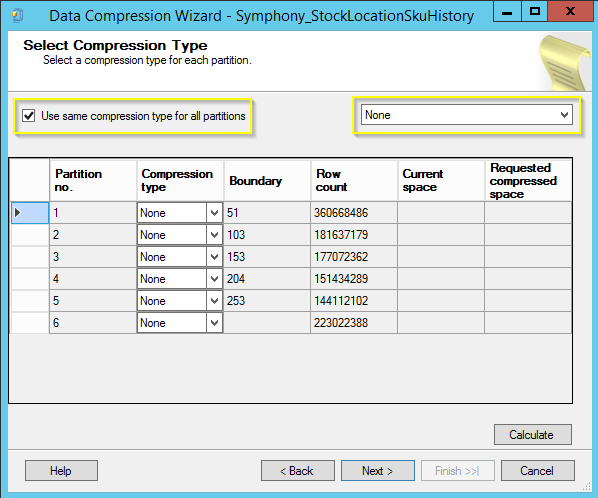
- On the Select Compression Type page, select None as the compression type to apply to each partition in the index on which you want to disable compression. Mark the Use same compression type for all partitions. When finished, click Next.
- In the Select an Output Option page, specify how you want to complete this task.
- Select Run immediately to create the new partitioned table after completing all remaining pages in the wizard.
- On the Review Summary page, under Review your selections, expand all available options to verify that all settings are correct. If everything is as expected, click Finish.
Comments
0 comments
Please sign in to leave a comment.