

Overview
When trying to asses whether a buffer size is too low, the indication is when the buffer penetration of a certain SKU in a certain Stock Location is in Too Much Red (TMR). In a steady state the Inventory at Site of a certain buffer should fluctuate mostly in the Yellow zone. Being Too Much in the Red zone of the buffer means that we do not provide sufficient protection and therefore risking the availability of this SKU. We can suggests several explanations for Too Much Red:
- Demand has grown (the preferred reason).
- The supply side has deteriorated.
- The initial buffer size was too low.
- Demand fluctuates severely.
Refer to this page for further information and details about TMR recommendation.
Too Much Red Policies
Being Too Much in the Red may have different interpretations and different consequences among different environments. Therefore, we define the following policies to define a Too Much Red behavior.
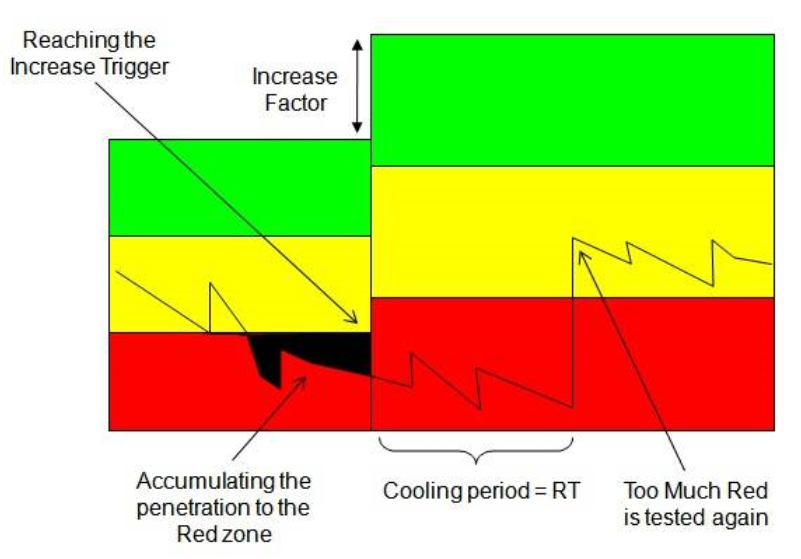
Increase Trigger - This is a sensitivity trigger for a Too Much Red alert. Conceptually, this trigger represents the maximal amount penetration we allow in the Red zone during the last penetration of Inventory at Site into the Red. Since we are working on a discreet daily resolution we count the daily penetrations into the Red as long as the Inventory at Site remains in the Red zone. The Increase Trigger represents the percentage of Red zone we allow to accumulate before a Too Much Red alerts pop out. The default Increase Trigger is 100% of the Red zone, for example it equals to one day of shortage or two days in which the Inventory is in the middle of the Red zone.
Increase Factor - This is the factor of Buffer increase after an alert of Too Much Red is triggered. The default Increase Factor is an increase of 33% of the current buffer (increase by a full zone).
The decision to set a correct policy (Increase Trigger and Increase Factor) for a certain Buffer may be affected from several considerations. The following represents possible considerations:
- What is the cost of shortages.
- How fast is the buffer is consumed.
- How fast we want to increase inventories once we see that demand is up.
- How risky/important do we think this SKU is.
Cooling Period
After the Buffer is properly adjusted up we need to wait for an adjusting/cooling period before the buffer is tested again. In this time period we expect the Supply and Demand to adjust the Inventory at Site to fluctuate in the Yellow zone as desired. In this cooling period we aim for a sufficient time period until the Inventory is properly adjusted and yet for a relatively short time period to allow fast response to further changes if needed. Since the Inventory at Site is penetrating to the Red zone before the buffer increase it will most probably penetrate even deeper into the Red zone after the Buffer Increase. Therefore, we wait for the minimal time period so the Supply and Demand could be adjusted to the new buffer, this time period by default equals to the Replenishment time.
However, Onebeat can shorten or enlarge this default period according to actual supply. If Onebeat identifies a large delivery that was expedited and therefore arrived before the original Replenishment Time Onebeat will end the Cooling Period. On the other hand, if Onebeat identifies that supply is not done to fill the Buffer during the Cooling Period it enlarges the Cooling Period accordingly to be more than the original Replenishment Time. Right after the cooling period is over we start testing the Buffer for the Too Much Red conditions again.
Too Much Red Example:
Too Much Red Exceptions
Too Much Red alerts have some exceptions in which we cannot automatically determine whether the regular increase is justified. There are two types of such an exception:
- In some cases demand sharply increases and it might be that the Buffer should be increased by more than one third in order to react effectively. When we are facing a Too Much Red alert but assessing that the consumption had sharply increased lately we indicate an exception named - "Sharp Demand Increase". When viewing this exception one should examine the situation to decide whether the buffer should be increased by more than the current Increase Factor.
- When a Too Much Red alert is triggered but the supply is not done according to the assumptions of the model, meaning that replenishment is not regularly done to fill the top of the buffer, we cannot determine whether a buffer increase is indeed justified. In this case, we indicate an exception named - "Improper Replenishment". When viewing this exception one should examine the situation to decide whether the buffer should be indeed increased.
Small Buffer Size
SKUs with Buffers of size one go through a different process. Every time there is a consumption of the only unit that we keep in stock, the BP will hit black. Of course, we wouldn't want to increase the buffer each and every time there is a consumption. Therefore, the trigger to increase the buffer in these cases will be the Consumption Frequency. The user will define a consumption frequency that is normal for this product. For example, this SKU is usually sold once a week. In this example, we'll define the Consumption Frequency as 7. Now, in cases in which the number of days between the next consumption will be less than 7, Onebeat will recommend to increase the buffer to 2. Onebeat will count only days in which the inventory was greater than zero.
Comments
0 comments
Please sign in to leave a comment.