

Overview
When trying to asses whether a buffer size is too high, the indication is when the buffer penetration of a certain SKU in a certain Stock Location is in Too Much Green (TMG). In a steady-state, the Inventory at Site of a certain buffer should fluctuate mostly in the Yellow zone. Being Too Much in the Green zone means we are holding excessive stocks. These excessive stocks are undesired for the organization for various reasons (e.g. the cost of holding unnecessary inventories, the lost opportunity to produce alternative stocks that are needed instead). We can suggest several explanations for Too Much Green:
- Demand has diminished.
- The supply has improved significantly.
- The initial buffer size was too high.
Refer to this page for further information and details about TMG recommendation.
Too Much Green Policies
Being Too Much in the Green may have different interpretations and different consequences among different environments. Therefore, we define the following policies to define a Too Much Green behavior.
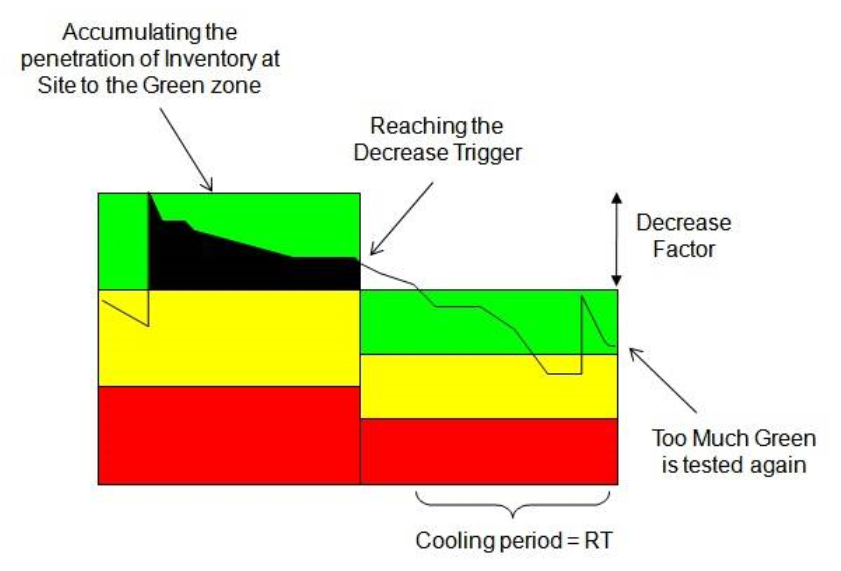
Decrease Trigger - This is a sensitivity trigger for a Too Much Green alert. Conceptually, this trigger represents the maximal amount of inventory we allow to accumulate in the Green zone during the last penetration of Inventory at Site into the Green. Since we are working on a discreet daily resolution we accumulate the daily penetrations into the Green as long as the Inventory at Site remains in the Green zone. The Decrease Trigger represents the percentage of Green zone we allow to accumulate before a Too Much Green alerts pops out. The default Decrease Trigger is 500% of the Green zone, for example: it equals to 5 consecutive days in which the Inventory at Site is in the top of the buffer.
Decrease Factor - This is the factor of Buffer decrease after an alert of Too Much Green is triggered. The default Decrease Factor is a decrease of 33% of the current buffer (decrease by a full zone).
The decision to set a correct policy (Decrease Trigger and Decrease Factor) for a certain Buffer may be affected from several considerations. The following represents possible considerations:
- What is the cost of holding excessive inventories.
- How fast is the buffer being consumed.
- How fast we want to lower inventories once we see that demand is going down.
- How risky/important do we think this SKU is.
Cooling Period
After the Buffer is properly adjusted down we need to wait for an adjusting/cooling period before the buffer is tested again. In this time period we expect the Supply and Demand to adjust the Inventory at Site to fluctuate in the Yellow zone as desired. In this cooling period we aim for a sufficient time period until the Inventory is properly adjusted and yet for a relatively short time period to allow fast response to further changes if needed. Since the Inventory at Site is in the Green zone before the buffer decrease it is reasonable that it will be higher than the new target buffer right after the buffer decrease. Therefore, we first wait for the Inventory at Site to penetrate back to the new buffer size. Thereafter we wait for an additional time period for the Supply and Demand to be adjusted to the new buffer, this time period equals to a Replenishment time. Right after the cooling period is over we start testing the Buffer for the Too Much Green conditions again.
Too Much Green Example
Too Much Green Exception
In some cases demand sharply decreases and it might be that the Buffer should be decreased by more than one third in order to react effectively. When we are facing a Too Much Green alert but assessing that the consumption had sharply decreased lately we indicate an exception named - "Sharp Demand Decrease". When viewing this exception one should examine the situation to decide whether the buffer should be decreased by more than the current Decrease Factor.
Comments
0 comments
Please sign in to leave a comment.